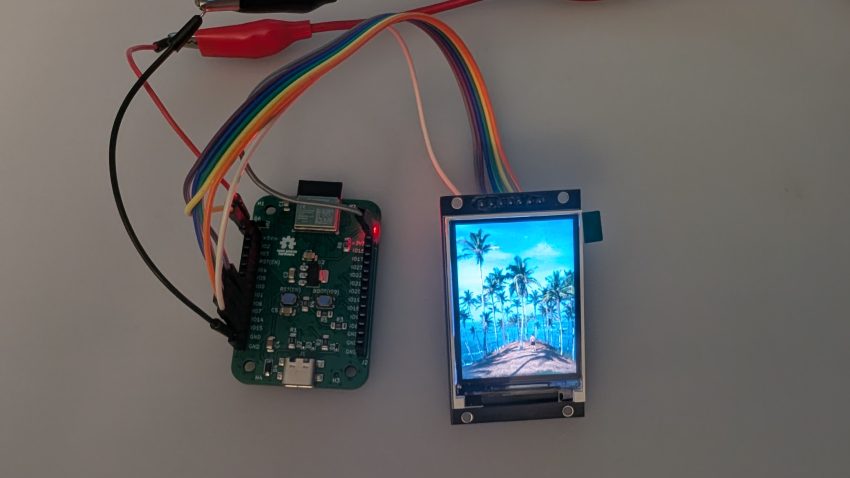
Small TFT displays are one of the quickest ways to add functional ‘bling’ to a microcontroller project. The ST7789 is a modern and popular TFT LCD controllers; it’s cheap, bright, and available in 240×240, 240×320 and 135×240 sizes. I wanted to develop a MicroPython library that did more than fill rectangles, so I built on an existing one and added the features I felt were missing.
The result is st7789_lcd_driver_micropython, an open-source (MIT) driver with text rendering, BMP file display, and rotation support.
GitHub: halherta/st7789_lcd_driver_micropython
I wrote this driver a while back when experimenting with my then newly developed ESP32-C6 based IoTLynx development board. It’s a simple library that can still do a lot of fun stuff with small TFT LCD’s in microPython.
Why another ST7789 driver?
This driver is based on the excellent devbis/st7789py_mpy. It’s a solid foundation for talking to the display, but I wanted to be able to put text and pictures on the screen without pulling in extra libraries or running out of RAM. So I added:
- Text rendering with a built-in 8×8 font and scalable output
- Bitmap and BMP file display, streamed from the filesystem
- Display rotation in four orientations (0°, 90°, 180°, 270°)
- Better memory efficiency for large images
Features at a glance
- Built-in 8×8 font with scalable text (and optional background color)
- Graphics primitives: pixels, lines, horizontal/vertical lines, rectangles and fills
- Draw RGB565 bitmaps straight from memory
- Stream 24-bit BMP files line by line, so full-screen images don’t need full-screen RAM
- Four rotation modes
- Optimized SPI communication
- Color helpers, including
color565()and predefined colors
Hardware
I tested the driver on an ESP32-C6 (especifically my IoTLynx development board ) with a 240×320 ST7789 display. It should work on other MicroPython-capable boards such as the ESP32, ESP8266 and RP2040, though I’ve only verified the ESP32-C6 myself.
Wiring
| ST7789 Pin | ESP32-C6 Pin | Description |
|---|---|---|
| VCC | 3.3V | Power supply |
| GND | GND | Ground |
| SCK | GPIO6 | SPI clock |
| MOSI | GPIO7 | SPI data |
| DC | GPIO2 | Data/Command |
| RST | GPIO10 | Reset |
| CS | GPIO15 | Chip select |
| BL | GPIO3 | Backlight (optional) |
These pin numbers are just an example, and you can change them in your code to match your board.
Installation
The driver is a single file, st7789py.py, that you copy onto your board.
With Thonny (easiest): open st7789py.py, choose File → Save As, pick MicroPython device, and save it with the same name. Do the same for test_st7789.py if you want to run the demo.
With ampy (command line):
pip install adafruit-ampy

ampy --port /dev/ttyUSB0 put st7789py.py
ampy --port /dev/ttyUSB0 put test_st7789.py
Quick start
import machine
import st7789py as st7789

# Initialize SPI
spi = machine.SPI(
    1,
    baudrate=80000000,
    polarity=0,
    phase=0,
    sck=machine.Pin(6),
    mosi=machine.Pin(7),
)

# Initialize display
display = st7789.ST7789(
    spi,
    240,      # Width
    320,      # Height
    reset=machine.Pin(10, machine.Pin.OUT),
    dc=machine.Pin(2, machine.Pin.OUT),
    cs=machine.Pin(15, machine.Pin.OUT),
    backlight=machine.Pin(3, machine.Pin.OUT),
)

# 0=portrait, 1=landscape, 2=portrait flipped, 3=landscape flipped
display.init(rotation=0)
display.backlight.value(1)

display.fill(st7789.BLACK)
display.text("Hello World!", 10, 10, st7789.WHITE, scale=3)
That’s all it takes to get text on the screen.
What you can do with it
Basic graphics
display.fill(st7789.RED)

display.rect(10, 10, 100, 50, st7789.WHITE)
display.fill_rect(20, 20, 80, 30, st7789.BLUE)

display.line(0, 0, 239, 319, st7789.GREEN)
display.hline(0, 100, 240, st7789.YELLOW)
display.vline(120, 0, 320, st7789.CYAN)

display.pixel(120, 160, st7789.WHITE)
Text
The built-in font is 8×8 pixels, and scale multiplies that size. You can also pass a background color, and \n gives you multi-line text.
display.text("Hello!", 10, 10, st7789.WHITE)
display.text("BIG TEXT", 10, 50, st7789.YELLOW, scale=4)
display.text("Info", 10, 100, st7789.BLACK, st7789.WHITE, scale=2)
display.text("Line 1\nLine 2\nLine 3", 10, 10, st7789.GREEN, scale=2)
Rotation
display.set_rotation(0)  # Portrait
display.set_rotation(1)  # Landscape
display.set_rotation(2)  # Portrait flipped
display.set_rotation(3)  # Landscape flipped
Bitmaps from memory
For small images you can build an RGB565 bitmap and draw it directly:
bitmap = bytearray()
for y in range(32):
    for x in range(32):
        color = st7789.color565(x * 8, y * 8, 128)
        bitmap.extend(color.to_bytes(2, 'big'))

display.draw_bitmap(bitmap, 50, 50, 32, 32)
Showing full-screen images without running out of RAM
A full 240×320 image in RGB565 is about 150 KB, which is more than many microcontrollers can spare. Instead of loading the whole file, draw_bmp_file_streaming() reads the BMP a few lines at a time and sends each chunk to the display.
# 24-bit uncompressed BMP only
display.draw_bmp_file_streaming('image.bmp', x=0, y=0)

# Shorter alias
display.draw_bmp_file('image.bmp')

# Fewer lines per chunk = less RAM
display.draw_bmp_file_streaming('image.bmp', x=0, y=0, lines_per_chunk=2)
You can tune lines_per_chunk to match the memory your board has available.
Preparing images
The driver only reads 24-bit uncompressed BMP files. The repo includes a PC-side helper, utility/conv_240_320.py, that converts common image formats to a correctly sized BMP using Pillow:
pip install Pillow

python conv_240_320.py photo.jpg beach.bmp
Then copy the result to your board with Thonny’s file panel or ampy --port /dev/ttyUSB0 put beach.bmp.
API cheat sheet
Setup
display = st7789.ST7789(spi, width, height, reset, dc, cs=None,
                        backlight=None, xstart=-1, ystart=-1)
display.init(rotation=0)
Drawing: fill, fill_rect, rect, line, hline, vline, pixel
Text: text(text, x, y, color, bg_color=None, scale=1), char(...)
Bitmaps: draw_bitmap, draw_bmp_file, draw_bmp_file_streaming
Display control: set_rotation, inversion_mode, sleep_mode
Troubleshooting
- Blank screen: double-check your wiring and SPI pins, make sure the backlight is on (
display.backlight.value(1)), and try a different rotation. - Inverted colors: try
display.inversion_mode(True)orFalse. - Mirrored or rotated text: cycle through
set_rotation(0)toset_rotation(3). - BMP won’t load: confirm it’s a 24-bit uncompressed BMP (run it through
conv_240_320.py), that it’s uploaded to the board, and that the filename matches exactly. - Out of memory: lower
lines_per_chunk, use smaller bitmaps, and free up unused objects.
Get the code
The driver is MIT licensed, so use it however you like. Contributions, bug reports and feature requests are welcome.
github.com/halherta/st7789_lcd_driver_micropython
If you build something with it, I’d love to hear about it in the comments.
See it in action
Video: demo of the driver running on an ESP32-C6 with a 240×320 ST7789 display.